
Vendora
POS, inventory, menu and store in one codebase
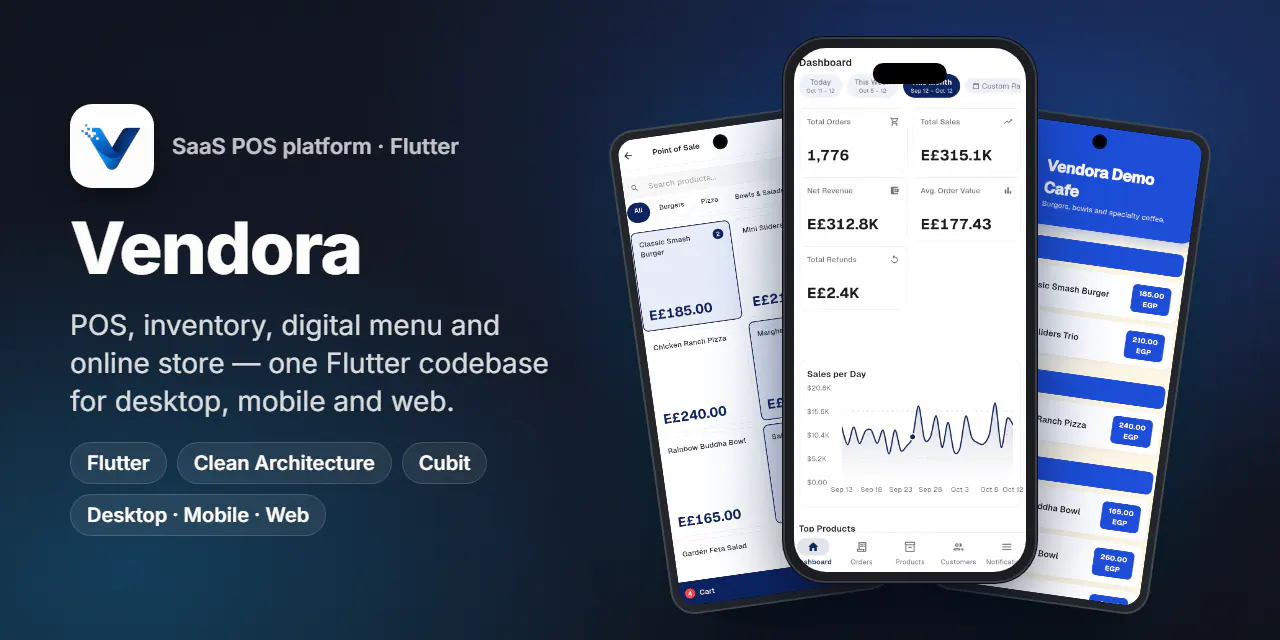
A multi-tenant POS and commerce SaaS in Flutter: keyboard-first POS, multi-branch inventory, reports, QR menu and online store on desktop, mobile and web.
- Country
 Egypt
Egypt- Type
- Source code
- Platforms
- Windows · Android · iOS · Web
- lines of Dart
- ~123k
- feature modules
- 29
- platforms, one codebase
- 4
- languages with RTL
- 5
Overview
Vendora is a SaaS for shops, cafés and restaurants. A vendor signs up, picks a plan and runs the business from one app: a keyboard-first POS on the counter PC, inventory across branches and warehouses, purchasing, reports and staff permissions, plus a public QR digital menu and online storefront built from the same catalog. A super-admin portal manages vendors, plans, billing and subscriptions.
The repository holds the full Flutter client: about 123k lines of Dart across 29 feature modules. The UI switches layout by width, a desktop shell with a sidebar at 1024 px and up and a mobile shell with bottom navigation below, while both share the same Cubits, use cases and repositories.
The challenge
- 01
One product, three form factors: a dense desktop POS with hotkeys and barcode scanning, a phone app for owners, and a no-login link for diners, all sharing one catalog and one order stream.
- 02
Multi-branch stock: every sale must decrement the right warehouse, and transfers, counts, adjustments and goods receipts must all be auditable.
- 03
White-label per vendor: each vendor brings its own colors, logo, menu design and storefront theme.
- 04
An Arabic-first market: full RTL, Arabic numerals and dates, and EGP/SAR currency formatting without breaking LTR layouts.
Highlights
Sales
- Desktop POS with branch and warehouse sessions, F1–F5 category tabs, barcode input, discounts, Ctrl+Z undo and change calculation.
- Cash, card or transfer payments with PDF receipts, auto-print and sound feedback.
- Mobile POS with a cart bottom sheet driven by the same
PosCubitandCartCubit. - Orders from POS, online and menu channels, with refunds, fulfillment status and public tracking.
- Reservations with a public booking page, schedules, time slots and closed dates.
Inventory and insights
- Stock by warehouse, stock movements and FIFO cost layers.
- Transfers (approve, post, receive), stock counts, adjustments and goods receipts.
- Suppliers with a ledger and aging report.
- A KPI dashboard with a 30-day sales chart, top products and top customers.
- P&L, sales, inventory valuation and FIFO profit reports, exported to Excel and PDF.
Online presence and platform
- A QR digital menu with 8 designs, live preview, QR code, PDF export and a public URL.
- An online storefront with 12 themes in light and dark, cart, checkout and order tracking (still in progress).
- Roles and permissions, branches, device security and an activity log.
- FCM push, analytics and remote error reporting, plus a super-admin portal for vendors, plans, billing and subscriptions.
Signature feature
The QR digital menu
- The vendor picks one of 8 designs (Modern Grid, Classic List, Dark Luxury, Minimal, Magazine, Promo Flyer, Billboard, Elegant Cards), sets primary and background colors and uploads a logo. Products, prices and visibility come straight from the catalog, and a menu-only price can override the POS price.
- On save, settings go to Cloud Firestore under
menus/{vendorId}, aslugIndex/{slug}document maps the public slug to the vendor, and the logo goes to Firebase Storage. - The public route
/menu/:slugskips the auth guard, resolves the slug and renders the chosen theme. A diner only needs a phone browser. - The builder generates a QR code with
qr_flutterand a printable PDF for the tables.
Screens
Swipe for more
Engineering notes
- 01
One codebase, two layouts
Routes pick a desktop or mobile page by
MediaQuerywidth (1024 px and up). Both share the same Cubit instance and data layer, so a fix in a use case reaches both. - 02
Keyboard-first POS
A
HardwareKeyboardhandler buffers fast key bursts to tell a barcode scanner from typing, and maps F1–F5 to categories, Enter to charge, D to discount, / to search and Ctrl+Z to undo. - 03
Clean architecture with typed failures
Cubits call use cases only, and repositories return
Either<Failure, T>, so the UI never sees an exception. Dependencies are wired withget_itandinjectable. - 04
Public routes beside a guarded app
/menu/:slug,/track/:tokenand/book/:slugare whitelisted in the router's redirect, so customers use them without an account while the staff app and admin-only/admin/*stay guarded. - 05
RTL and five languages
Strings live in JSON dictionaries of about 1,700 keys each, loaded by a custom
AppLocalizations. Directional padding and alignment mirror the whole app in Arabic, charts and tables included. - 06
Resilient sessions
An auth interceptor attaches the Bearer token, an error interceptor maps 401/402/403/5xx to typed failures, and on network errors
AuthCubitrestores the cached user instead of logging out.
Results
- About 123k lines of Dart across 29 feature modules, 100 pages, 45 Cubits and 68 routes.
- One width-adaptive codebase running on Windows desktop, Android, iOS and the web.
- Five languages, including full Arabic RTL, with about 1,700 keys each.
- Released as open source under the MIT license.
Stack
- Flutter
- Cubit
- Clean Architecture
- go_router
- get_it / injectable
- dartz
- Dio
- Firestore
- FCM
- fl_chart
- pdf / printing
- excel
- qr_flutter