
LegalPal
Every legal tool in one app
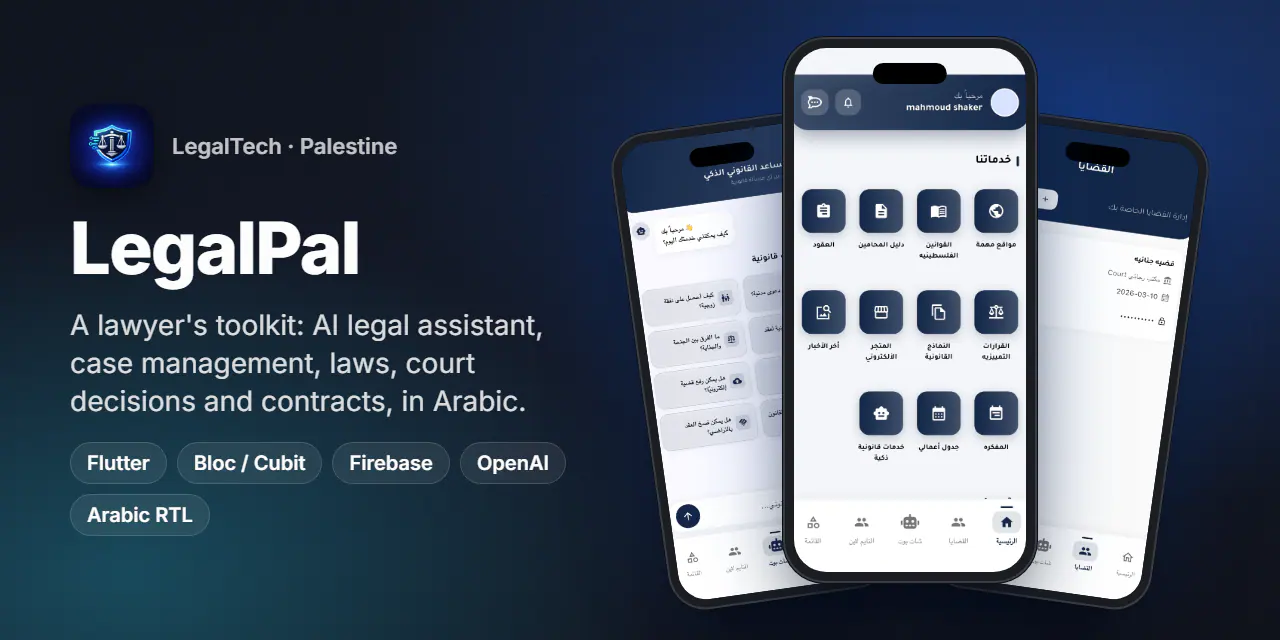
A legal platform for lawyers in Palestine: OpenAI legal assistant, cases, laws, court decisions and contracts, on mobile and a desktop-first web app.
- Country
 Palestine
- Type
- Client project
- Timeline
- 2026
- Platforms
- Android · iOS · Web
- installs on Google Play
- 100+
- platforms from one Flutter codebase
- 3
- areas in the desktop web navigation
- 9
Overview
LegalPal is a legal platform built for lawyers in Palestine. One app lets a lawyer ask an AI legal assistant, manage cases and the daily agenda, look up laws and court decisions, generate contracts, read legal news and talk to colleagues and support.
It ships on Android, iOS and the web from one Flutter codebase. On the web it becomes a real desktop application with top navigation, floating chat panels and an embedded landing page, while sharing all business logic with the mobile app.
Version 1.0 reached the App Store in May 2026. The backend is a Laravel 12 API with an admin dashboard.
The challenge
- 01
Lawyers juggle five tools: a PDF of the law, a WhatsApp group, a paper agenda, Word templates and a search engine. LegalPal had to replace them with one fast Arabic app.
- 02
Legal content is long and structured. Laws, court decisions and procedures need search, categories and readable detail pages on small screens.
- 03
The AI has to help with the actual job: drafting, summarising, rewriting and proofreading in formal Arabic, not a generic chatbot.
- 04
A phone UI does not scale up to a 1440 px monitor, yet phone, tablet and desktop had to share one codebase without crashing on mobile-only plugins.
- 05
Marketing and product in one deploy: visitors land on a sales page, and one click takes them into the real app as a guest or signed in.
Two parts, one product
Mobile app
Android and iOS app with the AI legal assistant, case management, laws, contracts, maps and realtime chat. Live on Google Play and the App Store.
GitHub 02Web platform
A desktop-first Flutter web UI with top navigation, a full-width AI assistant, floating chat panels and an embedded landing page.
GitHubHighlights
AI legal assistant (OpenAI)
- Chat assistant with conversation history and suggested questions about Palestinian law
- Smart services: consultation, contract and petition drafting, rewriting, summarising, term explanations, simplification and advanced analysis
- Image analysis: photograph a document to have it read and analysed
- Arabic proofreading with highlighted corrections
Knowledge base and lawyer workspace
- Palestinian laws, court decisions, legal clauses, procedure steps, books and useful external sites
- Case management with sessions, updates, search and password-protected sensitive files
- My agenda for appointments and a notebook for notes
- Contracts with fillable fields and PDF output, plus a library of legal forms
Community and services
- Lawyer directory with profiles, and a court directory on Mapbox maps
- A timeline of lawyers' posts and realtime support chat on Cloud Firestore
- Requests for legal services, an e-store, subscriptions and FCM push notifications
Desktop web platform
- Top navigation with nine areas: home, lawyers, cases, posts, AI assistant, chats, support, account and subscriptions
- Full-width AI assistant tab with suggested questions and image upload
- Messenger-style chat panels floating at the bottom of the screen, one per conversation
- Embedded RTL landing page that hands visitors into the app via
postMessage - Guest gate on private areas, clean path URLs and deep links
Signature feature
A legal assistant in the lawyer's pocket
- Chat first: the assistant opens with suggested questions, such as how to file a civil lawsuit or labour rights under Palestinian law, so the lawyer starts with one tap.
- Context: the conversation history goes back with every message, so follow-up questions work naturally.
- Specialised modes: drafting, rewriting, summarising, simplifying and analysis use dedicated system prompts, each returning formal, structured Arabic.
- Vision: attach a photo of a contract or a ruling, and the assistant extracts the text and analyses it.
- Proofreading: corrected text comes back with every fix highlighted, so the lawyer reviews changes instead of re-reading everything.
Screens
Mobile app
Swipe for more
Web platform
Swipe for more
Engineering notes
- 01
One router, two experiences
AppRouterserves the phone bottom-navigation layout on Android, iOS and iPad, and a separateWebHomeScreenon desktop browsers. The sameAppCubit,AuthCubit,DioHelperand models drive both, so a data-layer fix ships everywhere. - 02
Realtime support without a socket server
Support chat runs on Cloud Firestore streams, so messages arrive instantly with no extra backend infrastructure. On the web, each conversation becomes an independent, collapsible floating panel.
- 03
Iframe and Flutter handshake
The static landing page is mounted in an
HtmlElementViewiframe and sendspostMessage('legalpal-login'). Flutter listens and routes a new visitor in as a guest, or a returning one straight into the app. - 04
Conditional imports keep mobile clean
Web-only screens have
_stubtwins selected withif (dart.library.io), so the Android and iOS builds never importdart:htmlordart:ui_web. Messaging, Crashlytics and the Analytics observer start only when!kIsWeb. - 05
Force update through Remote Config
An update service compares the installed version with a Remote Config value and shows a blocking force-update screen when a critical fix ships.
- 06
Monitoring and Arabic-first UI
Crashlytics, Performance and Analytics are wired in at startup, with custom traces in
FirebaseMonitoringService. Every layout is RTL by default, with Arabic fonts, Arabic dates and a guest mode.
Results
- Live on Google Play with 100+ installs.
- Live on the App Store since May 2026 (version 1.0, Business category).
- Web platform and landing page ship from the same Flutter project as the store apps.
Stack
- Flutter
- Flutter Web
- Bloc / Cubit
- Dio
- OpenAI gpt-4o-mini
- Cloud Firestore
- Firebase
- Remote Config
- Mapbox
- Hive
- HTML / CSS landing
- Laravel 12 API